Troubleshooting
Why Is My iPhone Overheating? Normal Warmth vs Real Problems
When iPhone heat is normal, when it isn't, and what actually causes persistent overheating — from summer sun and charging habits to battery wear and board faults.
All our articles about troubleshooting.
Troubleshooting
When iPhone heat is normal, when it isn't, and what actually causes persistent overheating — from summer sun and charging habits to battery wear and board faults.
Troubleshooting
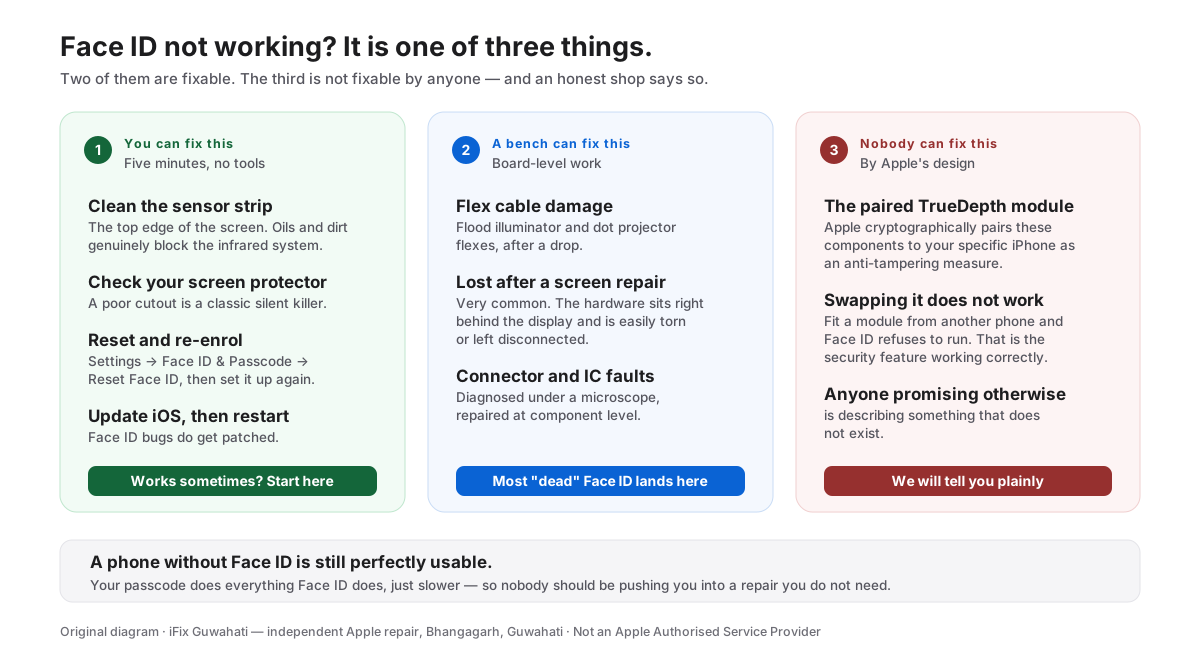
The honest guide to Face ID failures — software checks to try first, which hardware faults an independent shop can repair, and which are locked by Apple's pairing.
Troubleshooting
The real causes of blurry iPhone photos — dirty or scratched lenses, failed OIS after drops or bike vibration, moisture fog, and camera module faults — and what fixes each.
Troubleshooting
Muffled calls, silent ringtones, callers who can't hear you — how to isolate iPhone speaker and mic faults, what's just dirt, and which repairs fix each symptom.
Troubleshooting
Flickering, green tint, green lines or a full green screen on iPhone — which cases are software, which are the known OLED fault, and when it's the display connector or board.
Troubleshooting
MacBook plugged in but not charging — how to isolate the adapter, cable, port, battery or charging circuit, what the amber/green light means, and which repairs fix each.
Troubleshooting
A practical diagnostic path for fast iPhone battery drain — settings to check first, how to read Battery Health, and the signs that mean the battery itself is finished.
Troubleshooting
Loose cable, charges at an angle, or no charging at all — how to tell lint from port damage from a board fault, and what each fix involves in Guwahati.
Troubleshooting
Black screen, no response? Work through force restart, charging checks and recovery mode in order — and learn which symptoms mean the problem is hardware.
Troubleshooting
A black-screen MacBook rescue sequence — charger checks, SMC and display tricks, and the symptoms that separate a dead battery from a logic board fault.
Troubleshooting
Boot-looping iPhone showing only the Apple logo? Fixes ordered by data safety — force restart, recovery mode Update (not Restore), and when it's a hardware fault.
Talk to our technicians today — get a free diagnosis and a clear quote before any work begins.
Walk-ins welcome at Bhangagarh, Guwahati · Pickup & drop available
iFix Assistant
Typically replies instantly