Developing story. Written 25 September 2026, based on widely reported user accounts and Apple’s acknowledgement as reported in the technology press. If you are reading this later, check for an iOS update first — the fix may already be on your phone.
If you have just spent a great deal of money on an iPhone 18 Pro and it has started failing Face ID and restarting itself, the important thing to know is this:
Your phone is almost certainly not broken, and you should not be paying anyone to fix it.
What people are reporting
Since the iPhone 18 Pro went on sale on 18 September, owners have described a consistent pattern:
- Face ID fails on a specific action — often unlocking a locked app rather than the phone itself
- The phone then freezes
- It restarts and comes back to the lock screen
Some owners also report a “Face ID is Not Available” message when trying to set it up at all, and cases where the “Require Attention for Face ID” setting is not consistently respected.
Reporting has connected this to a hardware change on this generation: Apple moved the Face ID infrared camera beneath the top-left corner of the display to shrink the Dynamic Island. That is context for why a new bug might appear on this model — it is not evidence that your individual phone is defective.
Apple has acknowledged the problem, and reports from 24 September indicate a fix is coming in an iOS 27 update.
What to do
1. Update. Settings → General → Software Update. Install anything offered. This is where the fix will arrive.
2. Restart the phone. Genuinely worth doing, and free.
3. Re-enrol Face ID if it is behaving oddly but works: Settings → Face ID & Passcode → Reset Face ID, then set it up again.
4. If it is unusable, go to Apple. Your phone is days old and under warranty. This is Apple’s issue and Apple’s cost.
5. Do not pay for a repair. Not to us, not to anyone.
Why a repair shop is telling you not to buy a repair
Because this is exactly the situation where people get taken advantage of.
A frightening symptom on an expensive new phone, an owner who wants it fixed today, and a shop willing to take the money. We would rather say plainly: there is nothing here to repair. A software bug is not fixed by opening a phone, and anyone charging you to “repair Face ID” on an iPhone 18 Pro right now is charging you for an update.
There is a second reason. Your phone is under Apple’s warranty, and third-party work on a device this new can affect that cover. Even if we could help — and for this, we cannot — sending you to Apple is the right advice.
We say the same thing on our iPhone 18 repair page: a fault that appeared on its own, on a phone this new, belongs with Apple. Accidental damage is our work. This is not that.
When it is worth getting looked at
The distinguishing question is simple: did something happen to the phone?
| What happened | What it means |
|---|---|
| Nothing — it started on its own | Matches the reported bug. Update and wait. |
| It was dropped | Face ID hardware sits behind the display and is easily damaged. Worth diagnosing. |
| It got wet | Different problem, and time-critical — act the same day |
| The screen was replaced somewhere | Face ID is commonly lost during careless screen work. Often repairable. |
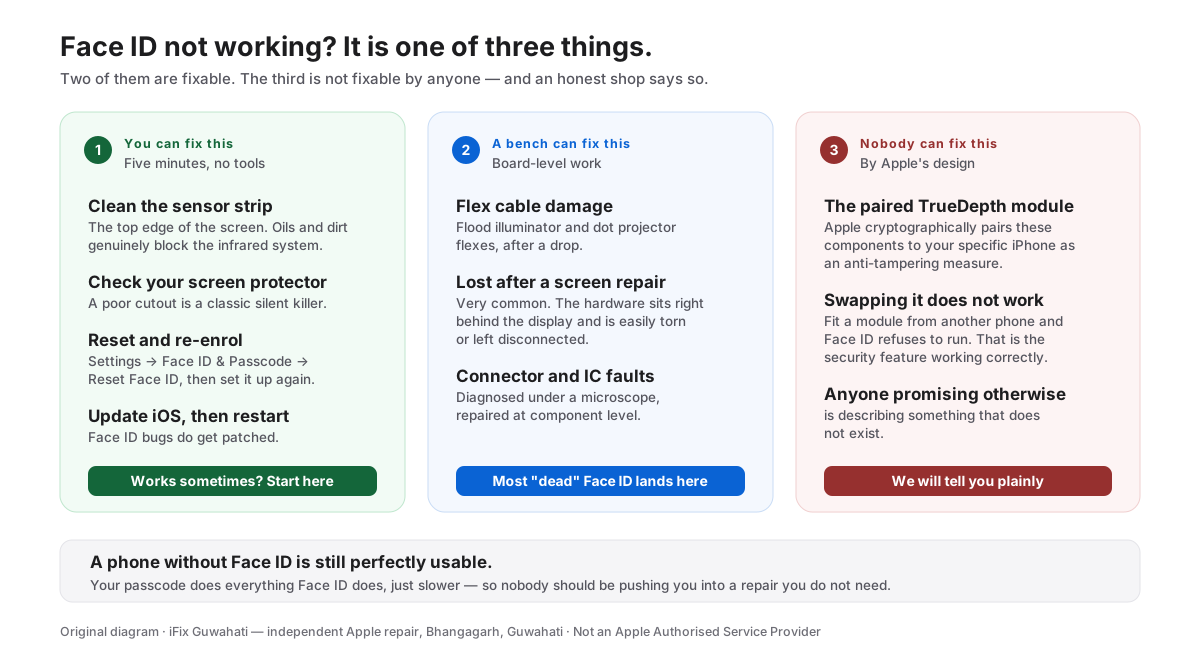
For anything in the bottom three rows, or for Face ID problems on older iPhones — which have entirely different causes — the full picture is here: why is Face ID not working, and what is actually fixable.
That guide is worth reading whatever your model, because it explains the part most shops will not tell you: some Face ID components are cryptographically paired to your specific iPhone, and no independent shop anywhere can replace them. Anyone promising otherwise is describing something that does not exist.
A note on the other iPhone 18 Pro reports
Alongside Face ID, some owners have reported unexpected restarts in other situations, touch responsiveness problems, and cosmetic complaints about the finish.
We are not going to speculate about how widespread any of that is, and we have not had one of these phones on the bench long enough to say anything useful from experience. When we have, we will write about what we actually see.
What we can say now: on a phone that is days old, under warranty, and misbehaving without having been damaged, Apple is the right first stop. Every time.
Not sure whether yours is the bug or actual damage? Tell us the model and, more importantly, what happened just before it started. If the answer is “go to Apple, do not spend anything here”, that is what you will get.
Talk to us → · iPhone 18 repair in Guwahati → · +91 91271 99144